Zero-downtime schema and data migrations with expand–contract
Renaming one column without downtime takes five deploys, and that's fine. The expand–contract pattern step by step: dual writes, batched backfills, verification, switching reads, and rolling back at every stage.
Most risky changes to a running system aren’t code changes. They’re changes to data: renaming a column, splitting a table, moving an entity to a new service, moving a whole dataset to new infrastructure. The application code that depends on the data is deployed continuously; the data has to stay correct the entire time.
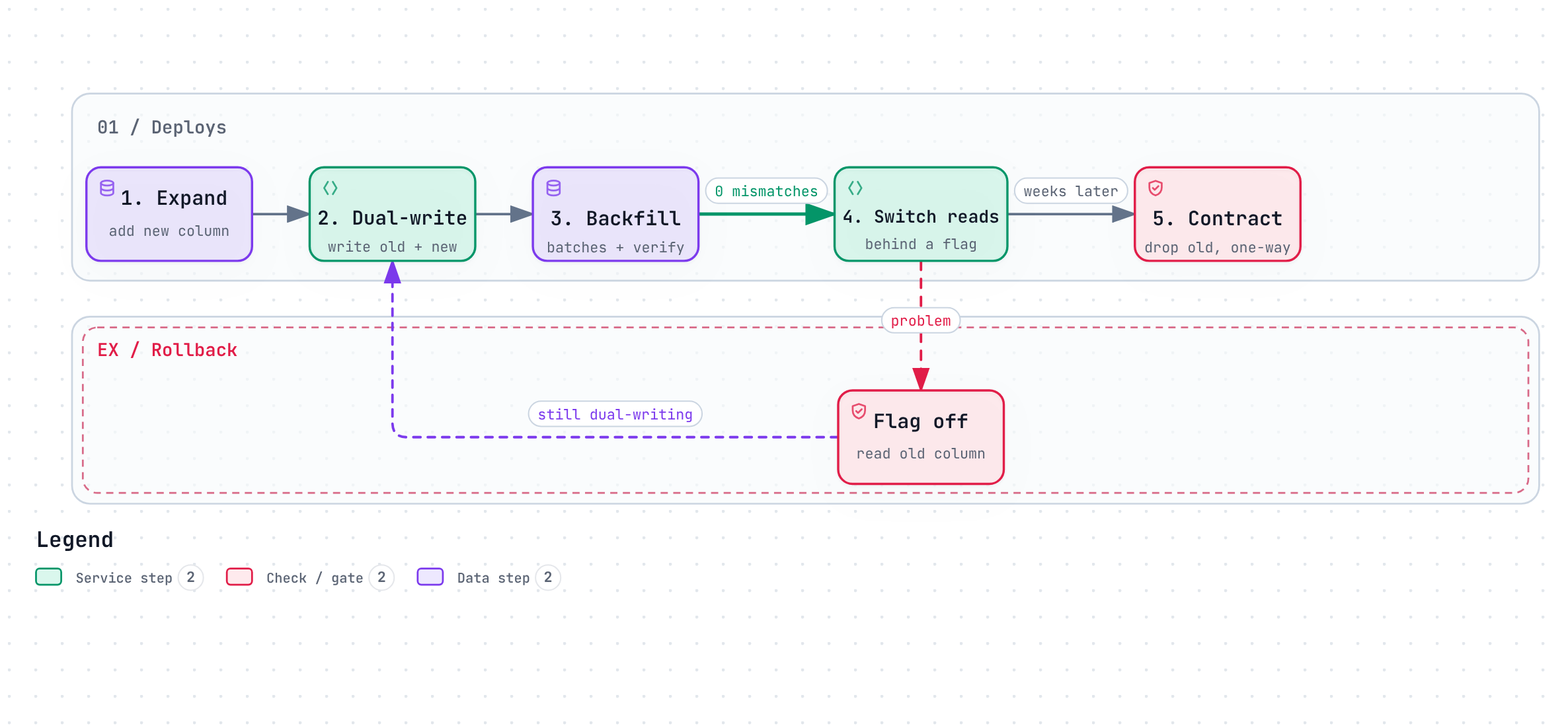
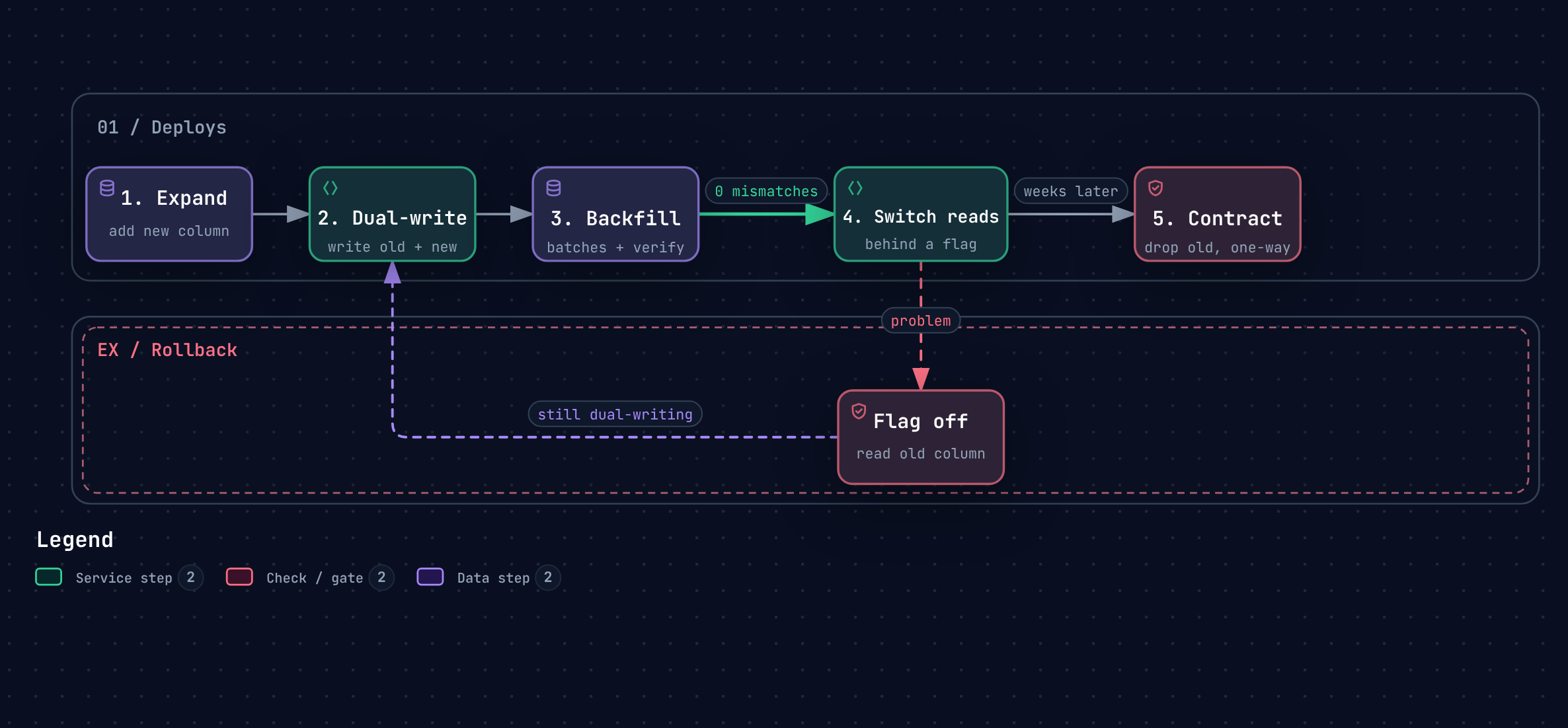
The pattern that makes this safe is expand–contract (also called parallel change). It replaces one big, irreversible step with several small, reversible ones. Renaming a single column becomes about five deploys. That’s the point.
The running example
We want to replace customers.phone (free text, inconsistent formats) with customers.phone_e164 (normalised, validated). The table is large and written to constantly. A downtime window is not an option.
Phase 1: Expand
Add the new column, nullable, with no default that would rewrite the table:
ALTER TABLE customers ADD COLUMN phone_e164 TEXT;Nothing reads or writes it yet. Deploying this is boring by design. On Postgres, adding a nullable column without a volatile default is a metadata-only change; on other engines, check whether the operation rewrites the table, and use an online schema-change tool if it does.
Phase 2: Dual-write
Change the application so every write sets both columns:
customer.setPhone(rawPhone);
customer.setPhoneE164(PhoneNumbers.toE164(rawPhone).orElse(null));
Reads still use the old column. From this deploy onwards, every new or updated row is correct in both places. Put dual-writing behind a flag so you can turn it off without a deploy.
Phase 3: Backfill, then verify
Now fix the old rows — in small batches, never one giant UPDATE:
UPDATE customers
SET    phone_e164 = normalise_e164(phone)
WHERE  id IN (
    SELECT id FROM customers
    WHERE  phone_e164 IS NULL AND phone IS NOT NULL
    ORDER  BY id
    LIMIT  5000
);
Run it in a loop with a short pause between batches, watching replication lag and database load. A single huge update holds locks for a long time, bloats the table and can push replicas minutes behind.
Then verify before you trust it:
SELECT count(*) FROM customers
WHERE  phone IS NOT NULL
AND    phone_e164 IS DISTINCT FROM normalise_e164(phone);
The answer should be zero, or a known list of values that genuinely can’t be normalised — which is a product decision, not a migration detail. Verification is the step teams skip, and it’s the one that catches the bug in your normalisation function before customers do.
Phase 4: Switch reads
Flip reads to the new column, behind a flag, ideally gradually (a percentage of traffic, or one service at a time). Keep dual-writing. If anything looks wrong, flip the flag back: the old column is still complete and current.
For high-stakes data, run a shadow read first: read both columns, serve the old one, and log any mismatch. A week of zero mismatches is a strong signal.
Phase 5: Contract
Only when reads have used the new column for a while with no issues:
- Stop writing the old column (deploy).
- Remove the old column from the code entirely (deploy).
- Drop it from the database (migration).
This is the only one-way step, which is why it comes last and why it’s split up. And actually do it: half-finished migrations, where both columns live forever and nobody remembers which is the truth, are a very common kind of tech debt.
The same shape, bigger
Expand–contract scales from a column to a whole system:
| Change | Expand | Dual-write | Backfill + verify | Switch reads | Contract |
|---|---|---|---|---|---|
| Rename a column | New column | Write both | Batch update | Read new | Drop old |
| Split a table | New table | Write both | Copy rows | Read new table | Drop old columns |
| Move an entity to a new service | New service + store | Write via both | Copy history | Route reads to new service | Retire old code path |
| Move data to new infrastructure | Provision target | Replicate / sync | Bulk copy + checksums | Cut over traffic | Decommission source |
The bigger the change, the more the phases benefit from automation: each phase becomes a step with a precondition check, an action, a verification and a rollback. That’s the point where a durable workflow engine starts paying for itself — see Durable workflows vs. a queue and a cron job.
Takeaways
- Split a risky data change into expand, dual-write, backfill + verify, switch reads, contract.
- Backfill in small batches, and verify with a query before switching reads.
- Keep every phase except the last reversible with a flag.
- Finish the contract phase — otherwise the migration becomes permanent debt.