Durable workflows vs. a queue and a cron job
If your job has more than three steps and must survive restarts, you're writing a workflow engine by hand. What queue + cron + status table turns into, what a durable workflow engine like Temporal gives you, and when it's overkill.
Some work doesn’t fit in a request. Moving a customer’s data to new infrastructure. Onboarding a merchant across five systems. Generating, approving and sending a large batch of documents. These jobs have many steps, take minutes to days, call systems that fail, and must survive deploys and crashes.
Most teams start the same way: a queue, a cron job and a status column.
What queue + cron becomes
Version one is clean: a job row with status = PENDING, a worker that picks it up, does the work, sets DONE. Then reality adds requirements, one at a time:
- A step fails transiently → add a
retriescolumn and aRETRYINGstatus. - A worker dies mid-job → add
locked_byandlocked_at, and a cron that releases stale locks. - Step 4 must not run twice → add per-step status columns.
- A step needs to wait for a human approval or a 24-hour cool-down → add
resume_afterand another cron. - Step 6 fails permanently after steps 1–5 succeeded → write undo logic, scattered across the codebase.
- Nobody can tell where a job is → build an admin page that reads all these columns.
Each addition is reasonable. Together they’re a workflow engine — one with no tests for its failure paths, state spread across columns, and behaviour that only one engineer fully understands. (The picture at the end of this post is only slightly exaggerated.)
What a durable workflow engine gives you
A durable workflow engine — Temporal is the one I’ve used; Cadence, AWS Step Functions and others share the idea — lets you write the process as ordinary code while the engine persists every step’s progress:
@WorkflowInterface
public interface DataMoveWorkflow {
    @WorkflowMethod
    void move(String accountId);
}

public class DataMoveWorkflowImpl implements DataMoveWorkflow {

    private final MoveActivities act = Workflow.newActivityStub(MoveActivities.class,
            ActivityOptions.newBuilder()
                    .setStartToCloseTimeout(Duration.ofMinutes(30))
                    .setRetryOptions(RetryOptions.newBuilder()
                            .setInitialInterval(Duration.ofSeconds(5))
                            .setBackoffCoefficient(2.0)
                            .setMaximumAttempts(5)
                            .build())
                    .build());

    @Override
    public void move(String accountId) {
        Saga saga = new Saga(new Saga.Options.Builder().build());
        try {
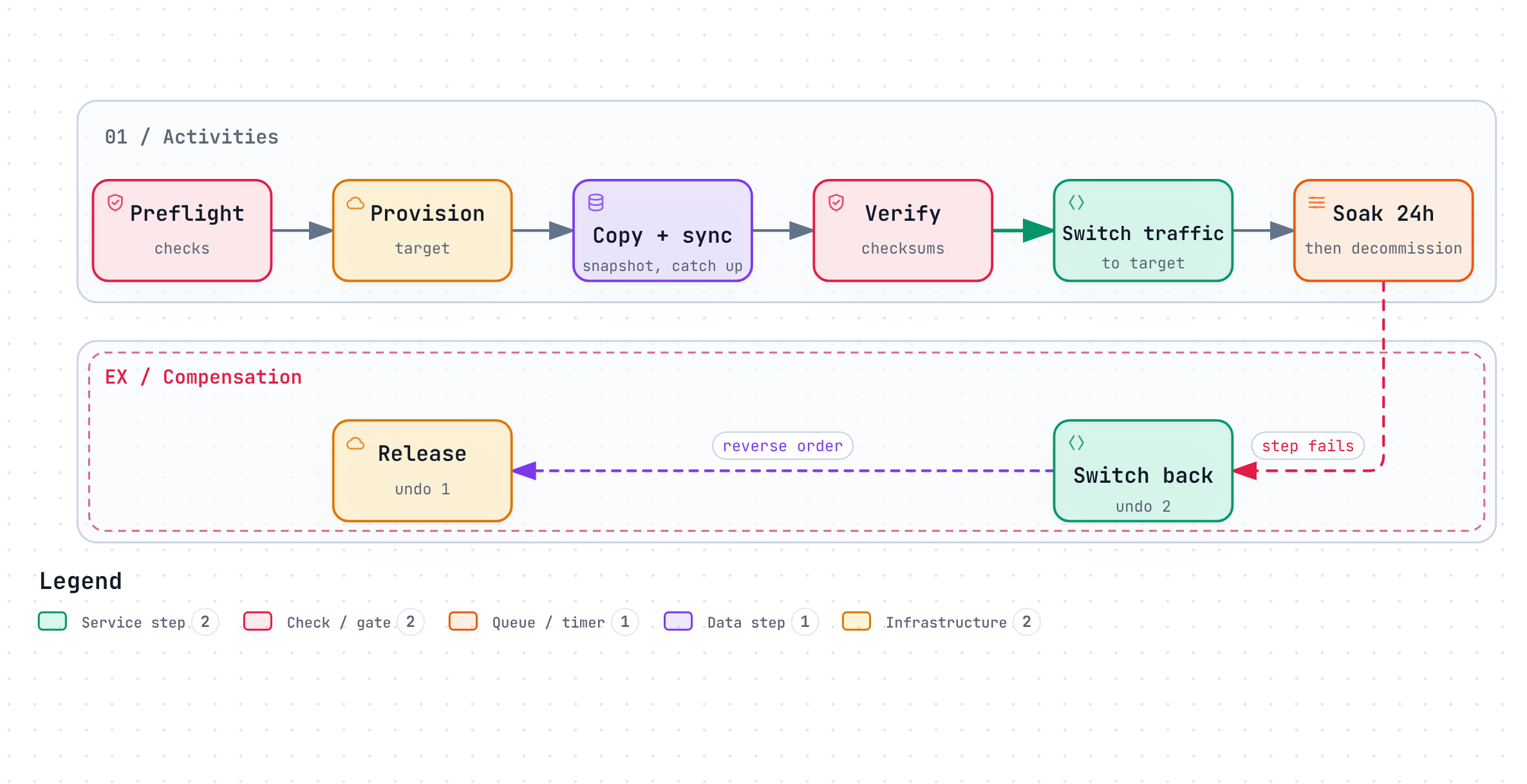
            act.preflightChecks(accountId);

            String target = act.provisionTarget(accountId);
            saga.addCompensation(act::releaseTarget, target);

            act.copySnapshot(accountId, target);
            act.syncChanges(accountId, target);       // catch up writes made during the copy
            act.verifyChecksums(accountId, target);

            act.switchTraffic(accountId, target);
            saga.addCompensation(act::switchTrafficBack, accountId);

            Workflow.sleep(Duration.ofHours(24));     // soak period; costs nothing while waiting
            act.decommissionSource(accountId);
        } catch (ActivityFailure e) {
            saga.compensate();                        // undo completed steps in reverse order
            throw e;
        }
    }
}
What the engine handles for you:
- Durability. Each completed activity is recorded. If the worker crashes after
copySnapshot, a new worker replays the history and continues atsyncChanges— it doesn’t copy again. - Retries and timeouts per step, as configuration rather than columns.
- Long waits.
Workflow.sleep(Duration.ofHours(24))holds no thread and no lock; the engine wakes the workflow when the timer fires. The same goes for waiting on a signal, such as a human approval. - Compensation. The
Sagahelper records how to undo each step and runs the compensations in reverse if a later step fails. - Visibility. Every workflow’s current step, history and inputs are queryable — the admin page you’d otherwise build.
The price: determinism
Workflow code is replayed to rebuild state after a crash, so it must make the same decisions every time it runs with the same history. In practice:
- No
Thread.sleep,System.currentTimeMillis(),UUID.randomUUID()orRandomin workflow code — useWorkflow.sleep,Workflow.currentTimeMillis(),Workflow.randomUUID(). - No I/O in workflow code. Database calls, HTTP calls and file access go in activities.
- Changing a running workflow’s logic needs versioning (
Workflow.getVersion), because in-flight workflows replay against the old history.
Activities, on the other hand, are normal code — and because they’re retried, they must be idempotent (see Idempotency keys).
These rules take a week to internalise. They also force a clean separation between “what happens in what order” (workflow) and “how each step talks to the world” (activities), which tends to make the code easier to read.
When it’s worth it — and when it isn’t
| Situation | Queue + worker | Durable workflow |
|---|---|---|
| One step, idempotent, seconds long | ✅ Simple and enough | Overkill |
| 2–3 steps, no waits, rare failures | ✅ Usually fine | Optional |
| Many steps, external systems, partial failure needs undo | Grows into a hand-built engine | ✅ |
| Waits of hours or days, human approvals | Crons and resume_after columns |
✅ Timers and signals |
| You must answer “where exactly is job X?” | Build an admin page | ✅ Built in |
The real cost is operational: you run (or pay for) the engine’s cluster and learn its model. For one small job, that cost dominates. For a platform that runs long, multi-step processes every day — migrations, onboarding, provisioning — it pays for itself quickly, because every new process gets retries, timers, visibility and compensation for free.
Takeaways
- A queue + cron + status table grows into a workflow engine; decide early whether to build one or adopt one.
- Durable workflows give resumability, per-step retries, cheap long waits, compensation and visibility.
- The price is determinism in workflow code and idempotency in activities.
- Use it for long, multi-step, failure-prone processes; keep simple jobs simple.