Kafka consumers in production: ordering, poison messages and lag
Most Kafka incidents are consumer incidents. Partition keys and ordering, at-least-once processing, poison messages and dead-letter topics, rebalances, and the one metric to alert on.
Kafka brokers are remarkably reliable. When a Kafka-based system misbehaves, the cause is usually on the consumer side: a message nobody can process, a loop that’s too slow, a partition key someone changed. I’ve built Kafka pipelines for high-volume email personalization and for ML platform services, and these are the rules I’d hand any team before their consumers go to production.
1. Ordering is per partition, and the key decides the partition
Kafka guarantees order within a partition, not across a topic. The producer’s message key decides the partition (by hash), so all messages with the same key land on the same partition, in order.
That makes the key a design decision:
- Events about one order must be processed in order (
CreatedbeforeCancelled) → key byorderId. - Events about one customer must be in order → key by
customerId. - No ordering needed → no key, and you get even spreading.
Two warnings. First, changing the key or the partition count moves keys to different partitions; for a while, old and new events for the same order can be processed out of order by different consumers. Plan those changes like a migration. Second, a hot key (one huge customer) means one hot partition, and that partition’s consumer becomes your throughput ceiling.
2. At-least-once: commit after processing, de-duplicate always
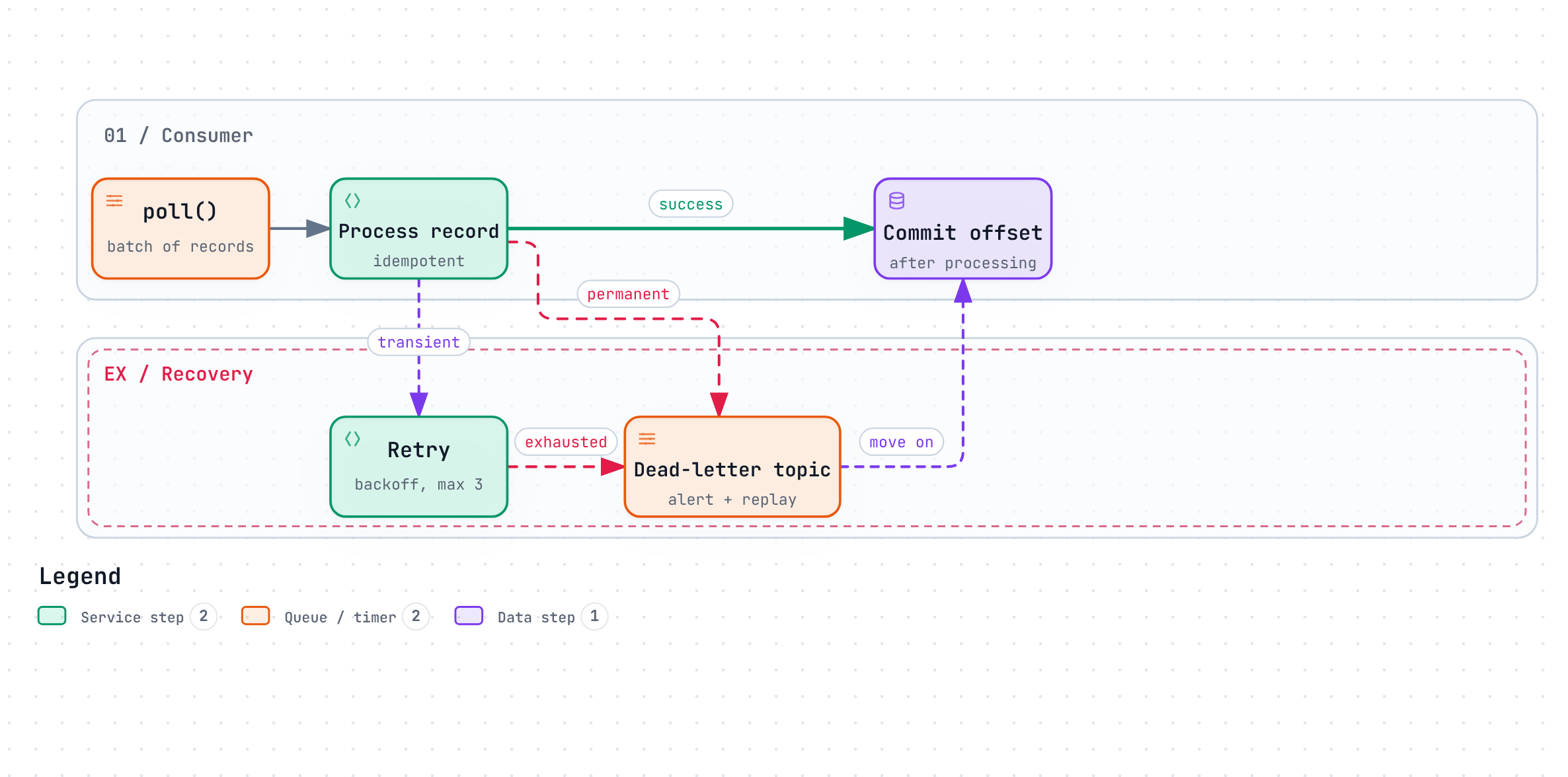
The safe default is: poll, process, then commit the offset. If the consumer crashes after processing but before committing, the messages are redelivered — so you get at-least-once delivery.
That means duplicates are normal, not exceptional, and processing must be idempotent: record the message’s unique ID (or a business key) in the same transaction as the side effect and skip anything already recorded. Committing before processing gives at-most-once instead: no duplicates, but a crash loses messages. For business events, that’s rarely the trade you want.
With Spring Kafka, the defaults already commit after the listener returns. Keep enable.auto.commit=false and let the container manage it.
3. Poison messages: don’t let one record block a partition
A poison message is one that will never succeed: malformed JSON, a schema the consumer doesn’t know, a reference to something that doesn’t exist. If the consumer retries it forever, every message behind it on that partition waits — consumer lag climbs, and downstream systems go quiet.
The fix is to classify errors:
| Error | Example | What to do |
|---|---|---|
| Transient | Database timeout, downstream 503 | Retry with backoff, a few times |
| Permanent | Deserialisation failure, validation error | Don’t retry; send to a dead-letter topic |
Spring Kafka’s DefaultErrorHandler does exactly this:
@Bean
DefaultErrorHandler errorHandler(KafkaTemplate<Object, Object> template) {
    var recoverer = new DeadLetterPublishingRecoverer(template);         // -> <topic>.DLT
    var backoff = new ExponentialBackOffWithMaxRetries(3);
    backoff.setInitialInterval(500);
    backoff.setMultiplier(2.0);

    var handler = new DefaultErrorHandler(recoverer, backoff);
    handler.addNotRetryableExceptions(DeserializationException.class,
                                      ValidationException.class);       // straight to DLT
    return handler;
}
Pair it with ErrorHandlingDeserializer so a record that can’t even be deserialised reaches the error handler instead of crashing the consumer in a loop.
A dead-letter topic is only useful if someone looks at it: alert when it receives messages, and have a way to replay them once the bug is fixed.
4. Keep the poll loop fast
A consumer must call poll() again within max.poll.interval.ms (5 minutes by default). If processing a batch takes longer — say, an external API call per record that suddenly takes 10 seconds — the broker decides the consumer is dead, triggers a rebalance, and hands its partitions to another consumer, which then hits the same slow API. You get a rebalance storm and almost no progress.
Ways out:
- Lower
max.poll.recordsso each batch finishes comfortably in time. - Put timeouts on every external call inside the listener.
- For genuinely long work, hand it off: write a task to a table or another topic and acknowledge the message quickly.
Use the cooperative sticky assignor (partition.assignment.strategy=CooperativeStickyAssignor) so rebalances move only the partitions that need to move instead of stopping every consumer in the group.
5. The one metric: consumer lag
Consumer lag is the number of messages produced but not yet processed, per partition. It’s the most honest measure of whether your consumer is keeping up, and it catches every problem above:
- Lag rising on one partition → a hot key or a poison message.
- Lag rising on all partitions → consumers too slow or too few, or a slow downstream.
- Lag flat but non-zero for hours → something stuck.
Alert on lag (or better, on estimated time-to-catch-up), not on consumer CPU. And scale consumers up to — but not beyond — the partition count: extra consumers in a group sit idle.
A checklist before go-live
- The partition key matches the ordering the business needs.
- Processing is idempotent; duplicates are tested.
- Transient and permanent errors are handled differently; a DLT exists, is alerted on, and can be replayed.
- Every external call in the listener has a timeout; batches finish well inside
max.poll.interval.ms. - Lag per partition is on a dashboard with an alert.
- You know what happens when you deploy: consumers restart, partitions rebalance, and nothing is lost or duplicated beyond what idempotency handles.
Takeaways
- Ordering is per partition; the key is a design decision.
- At-least-once is the default: de-duplicate.
- Dead-letter poison messages instead of retrying them forever.
- Keep the poll loop fast, and alert on lag.